
Why the bot deleted your message, and how to contest it
How a member finds the reason with /why, how to file an appeal, and how an administrator handles complaints without digging through the chat history.
Automated moderation makes mistakes — normal for any system of rules. What is not normal is a person not understanding what they were punished for and having nowhere to take it: the complaint then lands in an administrator's direct messages and the argument spills into the chat.
This article is useful to both sides, and it is convenient to send as a link to whoever turns up to argue.
For members: find the reason#
The /why command, right in the chat, answers what your last message was
deleted for. Only you see the answer. The /me command shows your status and
punishment history in this chat.
If the bot muted or banned you, it usually states the reason in the notice itself: which rule fired or, if the decision came from the model, its own wording. The reason is translated into the chat's language.
Showing the reason publicly is a chat setting. In some communities it is
appropriate, in others it turns into a manual for spammers — so your chat may not
publish reasons at all, and then /why is what is left.
For members: file an appeal#
If you think the bot got it wrong, appeals are filed in direct messages with the bot. You can add a comment to the request — that is exactly the place to explain the context calmly instead of arguing in the chat.
The request then gets one of these statuses: "Pending", "Awaiting your reply", "Approved", "Rejected". If something is unclear to the administrator, they can ask for clarification — you will get a message with a "Reply" button.
An approved appeal lifts the punishment, where lifting it is still possible.
For administrators: handling complaints#
The Appeals section in the dashboard. Requests are filtered by status, and the tab shows counters: how many are waiting for you and how many are waiting for the member.
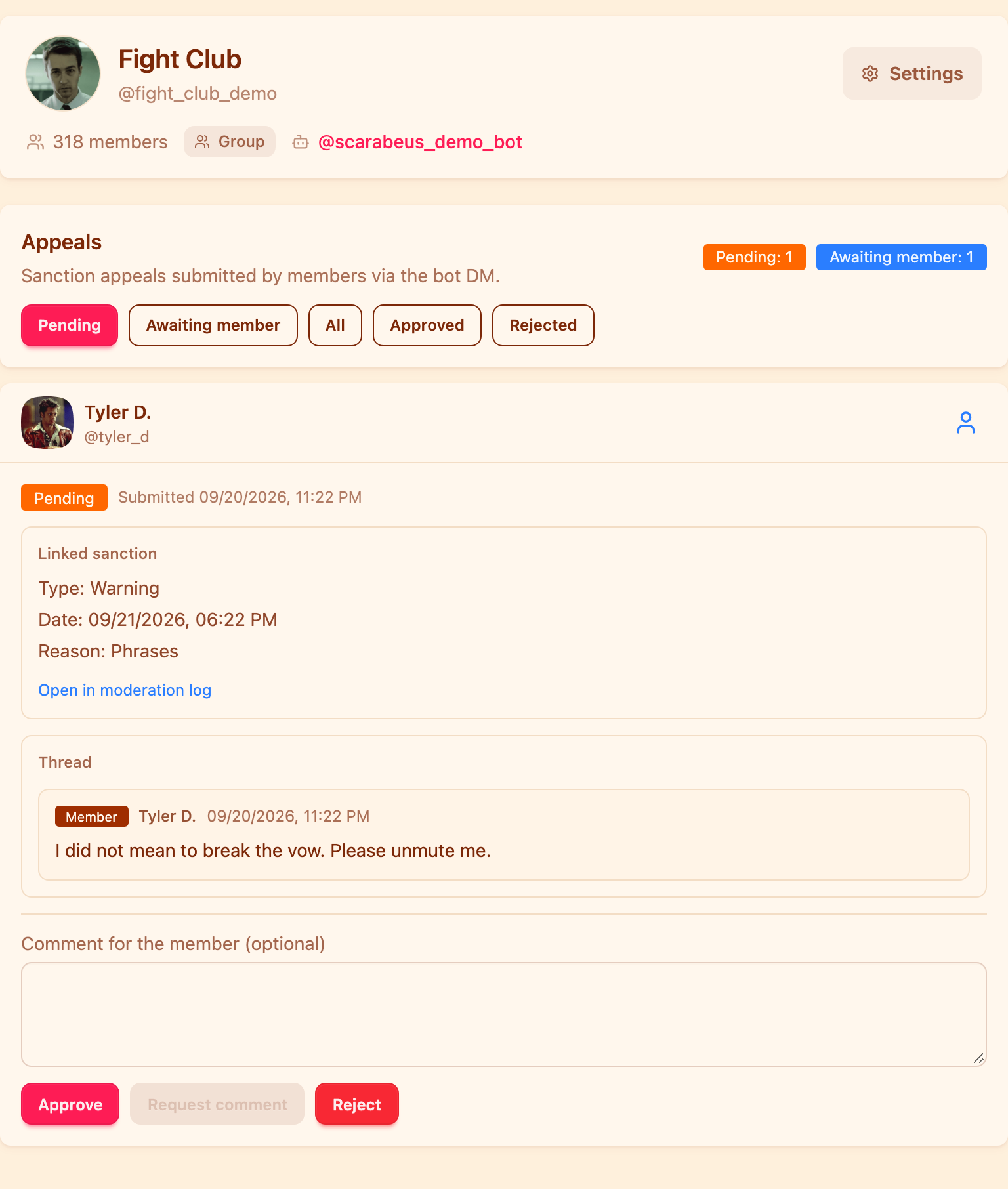
The request card gathers everything you need to decide, so there is nothing to search for in the history:
- the member's comment;
- the linked punishment: type, date, duration and reason;
- an "Open in the moderation log" link to the match itself;
- the conversation, if clarifications have already been requested.
There are three decisions: approve (the punishment is lifted), reject, and request a comment. You can attach text for the member to an approval or a rejection — and it is worth doing: a refusal without an explanation comes back as a new complaint.
Handling appeals is a separate permission, so it can be assigned to one person without opening up the moderation settings to them.
For administrators: understanding why it fired#
If the question is not whether the punishment was fair but why the rule fired at all, the answer is in the moderation log: it records which rule caught the message, which step of the chain was applied and what the bot posted to the chat. The text of the deleted message is kept — without it, arguing a borderline case is impossible.
A common discovery during such a review: it was not the rule you assumed. The message may have been cut off by length or duplicates long before it reached phrases.
Appeals are part of the Base plan.
Fewer borderline cases start with better-tuned rules: how to protect a Telegram group from spam.
How do I find out why the bot deleted my message?
Send /why in the chat and the bot will tell you which rule fired. Only you see the answer. The /me command shows your status and punishment history.
How do I contest a ban in a Telegram chat?
Write to the bot in direct messages and file an appeal, adding a comment with your explanation. The request reaches the administrators and a decision comes back.
Is the appeal handled by a bot or by a person?
By a person. The bot only delivers the request to the dashboard and returns the decision to the member.
What does "Awaiting your reply" mean?
An administrator asked for clarification. You have a message with a "Reply" button — the request stays in that status until you answer.
Why is there no reason shown in the chat?
Publishing the reason is configurable. Some chats switch it off so as not to tell spammers which rules are in place.
Read next
 Guides5 min read
How to moderate a Telegram forum topic by topic
How to give each forum topic its own rules, why a topic can only be stricter than the forum, and what the General topic really is.
 Guides5 min read
How to tell the bot in your own words what to delete
AI moderation rules are written in plain text. How to phrase them, what the model sees, and how to test a rule in the simulator.
 Guides3 min read
Bot commands in a Telegram group: the full list
Ban, mute and delete straight from the chat, as a reply to the offender. The full command list, duration formats and who can call what.